
Download Stellar Toolkit for Outlook – Email Recovery, Outlook Repair, Data Recovery, PST Repair, Mailbox Recovery
Overview
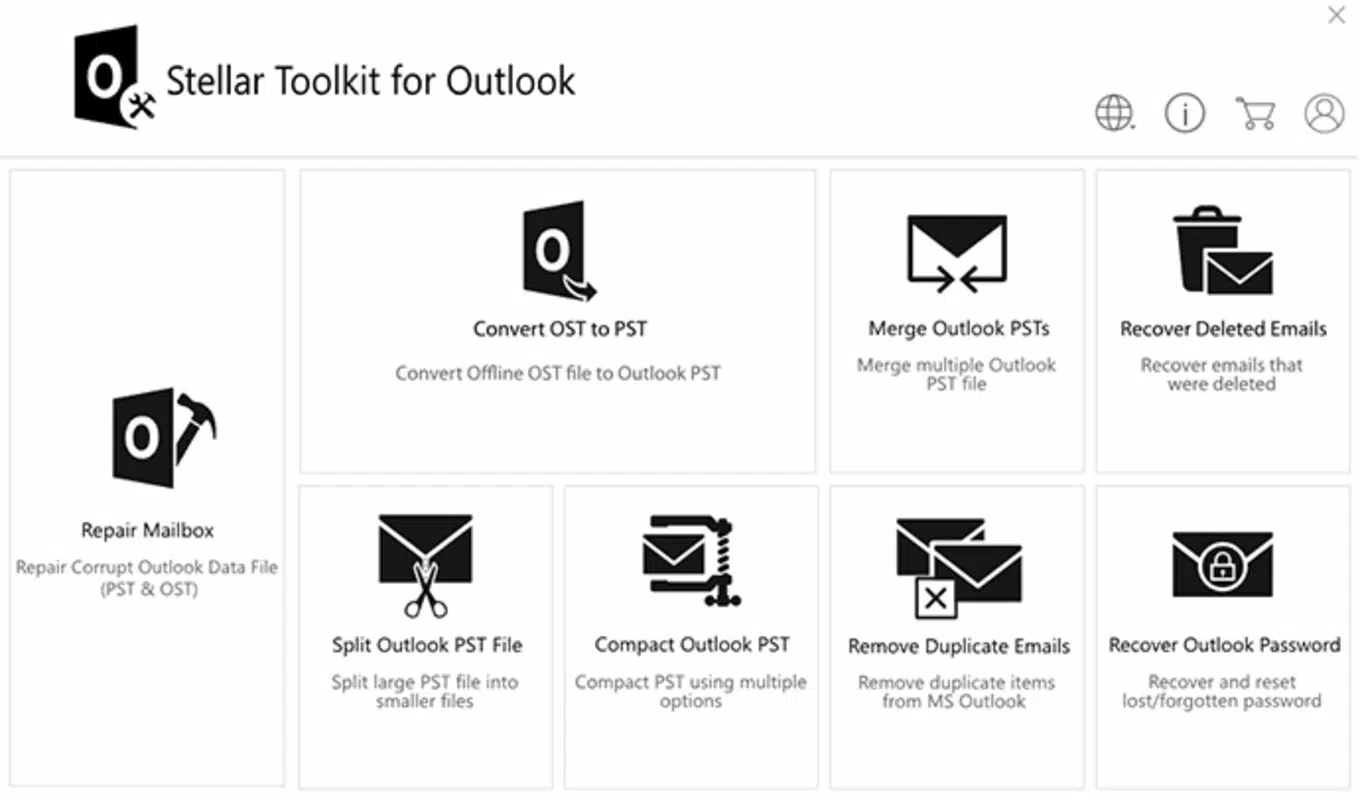
Stellar Toolkit for Outlook is a specialized utility designed to address critical data integrity issues within Microsoft Outlook environments. The application focuses on recovering lost, corrupted, or inaccessible email data, particularly when dealing with damaged Personal Storage Table (PST) files. For users relying on Outlook for professional or personal communication, the loss of email archives can lead to significant productivity setbacks and potential data loss. This tool aims to mitigate such risks by offering a targeted solution for restoring mailbox content, including emails, contacts, calendars, and attachments.
Primarily intended for individuals and organizations using Outlook on Windows, Stellar Toolkit for Outlook serves as a recovery-oriented utility rather than a daily productivity enhancer. Its core purpose is to restore data after accidental deletion, software crashes, or corruption caused by hardware failures or improper shutdowns. Real-world use cases include IT administrators recovering employee email archives after system failures, small business owners retrieving client correspondence, and professionals recovering important project-related emails.
Developed by Stellar, a company known for data recovery and repair software, the toolkit aligns with established industry standards for reliability in data recovery. Although the developer did not provide additional technical details about the underlying algorithms or scanning processes, the product’s focus on PST repair and mailbox recovery positions it as a niche but essential tool within the Windows productivity ecosystem. Its targeted functionality ensures it remains a valuable asset for users facing urgent data restoration needs.
Key Features & Functionality
- Advanced PST Repair Engine – Utilizes deep-scan algorithms to identify and repair corrupted PST files, enabling access to previously unavailable email data.
- Comprehensive Data Recovery – Recovers emails, contacts, calendars, tasks, notes, and attachments from damaged or inaccessible mailboxes.
- Support for Multiple PST File Types – Compatible with both ANSI and Unicode PST formats, ensuring broad usability across different Outlook versions.
- Preview Before Recovery – Allows users to preview recovered items before saving them to a new PST or exporting to other formats like EML, MSG, or PDF.
- Batch Processing Capability – Enables the repair and recovery of multiple PST files in a single session, improving efficiency for bulk operations.
For example, a user who experiences a sudden Outlook crash and cannot open their primary PST file can use the toolkit to initiate a repair process. The software scans the file, identifies corrupted sections, and reconstructs the data structure. Once repaired, the user can preview individual emails and folders to confirm integrity before exporting to a new PST or migrating to a cloud-based mailbox.
Another scenario involves an IT department managing multiple employee accounts. By leveraging batch processing, administrators can efficiently restore several corrupted PST files during a system migration or server upgrade. The ability to preview content before recovery reduces the risk of restoring incomplete or erroneous data, enhancing overall data accuracy and user confidence.
Interface, UX & Performance
The interface of Stellar Toolkit for Outlook follows a straightforward, task-oriented design, prioritizing functionality over visual flair. Users are guided through a series of steps—file selection, repair initiation, preview, and export—ensuring a logical workflow. The layout is clean, with clearly labeled buttons and progress indicators, making it accessible even for non-technical users.
Navigating between repair, preview, and export stages is intuitive, with minimal cognitive load. The tool avoids clutter by presenting only relevant options at each stage, reducing the chance of user error. Although the developer did not list formal performance metrics, the application appears responsive during standard operations, with noticeable processing times depending on file size and corruption level.
Performance on different device categories was not disclosed, but given the tool’s focus on Windows and typical resource usage of similar utilities, it is likely optimized for systems with moderate to high RAM and storage capacity. Stability during long-running scans and repairs is implied by the product’s purpose, though specific crash reports or error logs were not provided. Overall, the user experience is consistent with professional-grade data recovery tools, balancing simplicity with robust functionality.
Platform Compatibility & Technical Requirements
Stellar Toolkit for Outlook is designed exclusively for the Windows operating system. It supports the latest versions of Microsoft Outlook, though specific compatibility details were not listed. The application requires a minimum of 28.4 MB of disk space, which is relatively modest for a data recovery utility.
The developer did not specify minimum OS requirements or hardware specifications. As such, users should ensure their system meets standard Windows operating system standards for running Outlook applications. Compatibility with older versions of Outlook or legacy PST files was not confirmed, but the inclusion of both ANSI and Unicode PST support suggests broad backward compatibility.
Pros and Cons
Pros
- Specialized focus on PST and mailbox recovery for Outlook users.
- Supports both ANSI and Unicode PST file formats.
- Includes a preview feature to verify recovered data integrity.
- Offers batch processing for efficient handling of multiple files.
- Designed with a clear, step-by-step interface for ease of use.
Cons
- Only available for Windows, limiting cross-platform accessibility.
- Price point of $129.95 may be high for individual users.
- Developer did not provide detailed system requirements or performance benchmarks.
- Not suitable for real-time email management or daily productivity tasks.
- Requires technical understanding to handle complex corruption scenarios.
FAQ
Is Stellar Toolkit for Outlook safe to use?
The application is designed to operate on local PST files without altering the original data. It uses read-only access during scanning and repair, minimizing the risk of further damage. However, users should always back up their PST files before initiating any recovery process.
Can I recover emails after a hard drive failure?
If the PST file remains intact on the drive, even after a partial failure, the toolkit may be able to recover data. However, if the physical drive is severely damaged, professional data recovery services may be required first.
Does the tool support Outlook on Mac?
No, Stellar Toolkit for Outlook is currently available only for Windows. There is no version available for macOS or other platforms.
How often should I update the software?
It is recommended to keep the software updated to ensure compatibility with the latest Outlook versions and to benefit from performance improvements and security patches. Updates are typically released by the developer as needed.
Can I use this tool for commercial purposes?
Yes, the software is licensed for both personal and commercial use. Users should refer to the end-user license agreement for full terms and conditions.
Final Thoughts
Stellar Toolkit for Outlook stands out as a reliable, purpose-built solution for users facing the critical challenge of recovering lost or corrupted email data. Its focus on PST repair, comprehensive recovery capabilities, and user-friendly interface make it a strong choice for professionals and IT administrators who depend on Outlook for daily operations. While its price and platform limitation may deter casual users, the value it delivers in data restoration justifies its cost for those in need.
For anyone managing important email archives, especially in business environments, this tool offers peace of mind and a proven path to recovery. Whether dealing with a single corrupted file or multiple user mailboxes, the toolkit provides the necessary functionality to restore critical information with minimal risk.
Download Stellar Toolkit for Outlook now


